In addition to a Trend Tool object and a default trend, you can display trends on a tool-by-tool basis for CygNet-aware tools whenever this condition exists:
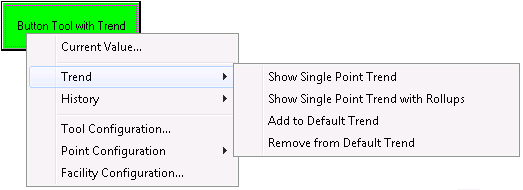
Tool-specific trends are displayed by right-clicking a tool that meets the condition above, selecting Trend, then choosing one of the first three trend options.
|
|
| Tool-Specific Trend Options in Run Mode Example |
For more information, see the following subsections below:
The following table lists and describes the four tool-specific trend options.
| Option | Description |
|---|---|
|
Show Single-Point Trend |
Select this option to display a single-point trend for the associated tool's point. |
|
Show Single-Point Trend with Rollups |
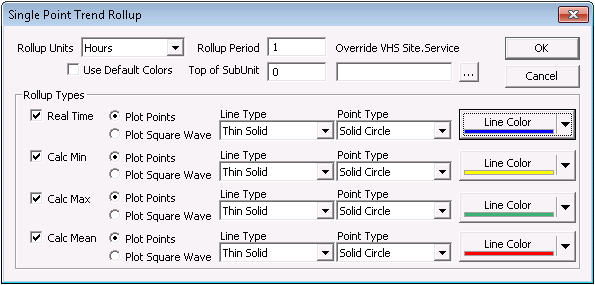
Select this option to display single-point historical rollups for the associated tool's point. Up to four pens can be enabled. These are as follows:
Configuration of single-point rollups occurs in TheFrame/TheView properties using the [SinglePointRollups] property. See Single-Point Trend Rollup Properties below for more information. |
|
Add to Default Trend |
Select this option to add a CygNet-aware tool's trend to the default trend. |
|
Remove from Default Trend |
Select this option to remove a CygNet-aware tool's trend from the default trend. |
Tool-specific trends depend almost entirely on the default trend's configuration. With the exception of single-point trend series and single-point trend with rollups series settings, the properties you set for the default trend apply to every tool-specific trend you display in a particular CygNet Studio or CygNet Vision screen.
Rollup types for a single-point trend are configured in TheFrame/TheView properties using the [SinglePointRollups] property. This is not the same thing as configuring rollups using options using the [DefaultTrend] property. Rollups that are not tool specific are configured on a series-by-series basis using settings on the Series Specifications dialog box.
Once [SinglePointRollups] settings are made for the TheFrame/TheView, they apply to every tool-specific single-point rollup for a particular CygNet Studio or CygNet Vision screen.
For more information about the properties of the dialog box below, see Editing a Series.
|
| Single-Point Trend Rollup Properties Example |
Run mode changes can be made to a tool-specific trend and those changes can be saved and viewed later using the Read Trend from File and Write Trend to File options located at the bottom of a tool-specific trend.
For general trend tool Run mode options, see Using the Trend Tool in Run Mode.

|
|
|

